RxAssist

Prescriptions, Transcribed. Trust, preserved.

Rx Assist saves your pharmacy time on prescription data extraction and Kroll busywork — pulling and verifying the details, understanding the patient context, and preparing the right path while keeping the pharmacist firmly in control.

Fill, Dispense, Transmit, and Adjudicate are never automated.

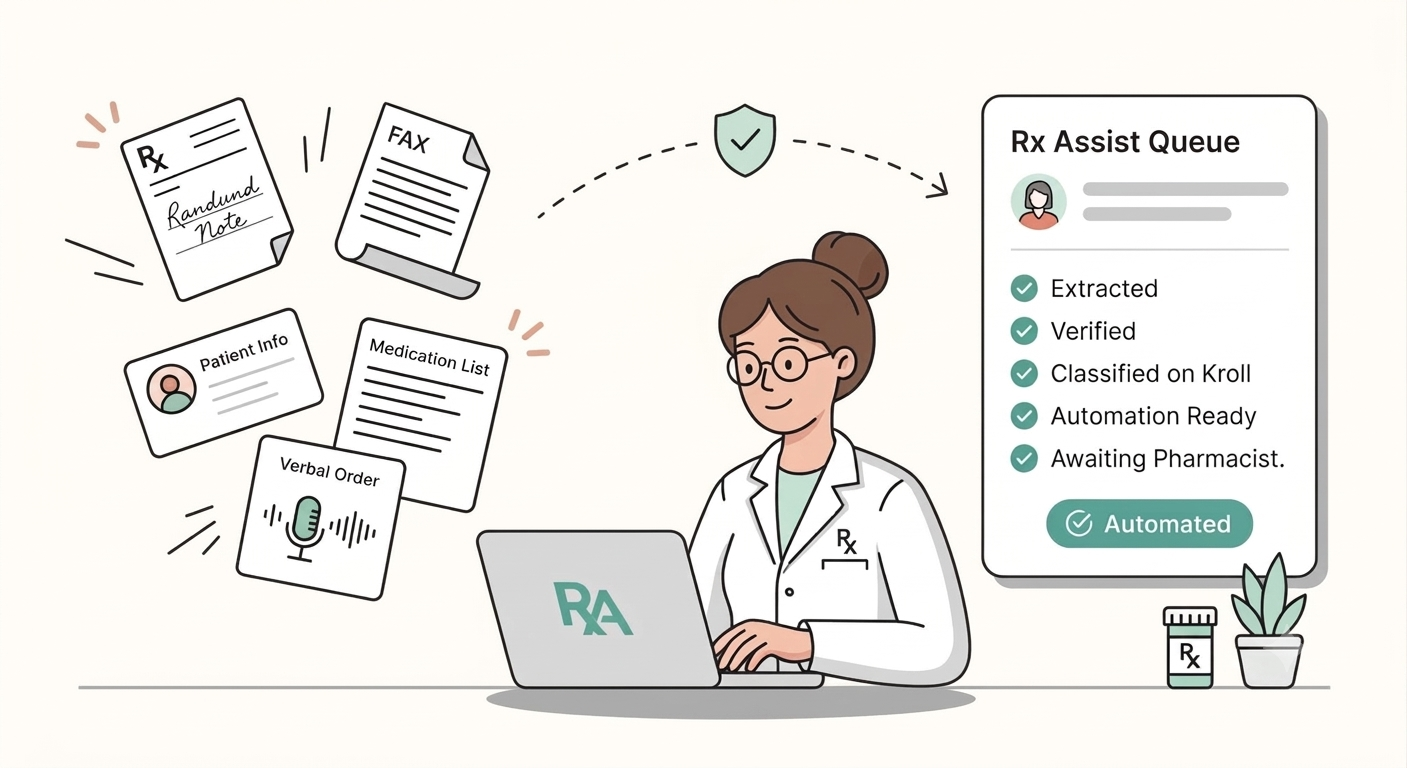
Rx Assist turns inbound faxes, notes, and orders into a verified Assist queue—awaiting pharmacist verification.

Inbound Rx → verified queue → await pharmacist verification

How it works

The busywork ends here.

Rx Assist turns prescription intake into a clear, Kroll-ready workflow — automatically — while the pharmacist stays in control of the final clinical decision.

RxAssist Agent | Reads. Understands. Automates.

Pharmacy issue

Unclear fax intake

Every illegible fax costs a tech minutes they don't have — and every misread field is a risk you don't need.

Rx Assist solution

Structured prescription intake

Saves time extracting patient, prescriber, and every medication field—even when the fax is hard to read.

Pharmacy issue

Risky profile decisions

New, changed, and discontinued medications are easy to miss in a busy queue.

Rx Assist solution

Live profile intelligence

Each medication is checked against the live patient profile so the right path is clear before anyone retypes.

Pharmacy issue

Repetitive Kroll work

Different staff, different shifts, different habits — the same fax shouldn't get handled five different ways.

Rx Assist solution

Consistent Kroll workflow

Rx Assist matches sig codes and completes the correct Kroll path, then awaits pharmacist verification.

Why Rx Assist

Let automation carry the busywork.

Built for Canadian pharmacies that need speed without surrendering visibility or control.

  • Automation with a safety boundary

    The agent handles intake, data extraction, classification, and Kroll actions—then awaits pharmacist verification so the pharmacist keeps the clinical decision.

  • Time you get back

    Every minute your team isn't re-typing a fax is a minute back on the floor with patients, and a minute off your labor cost. Rx Assist pulls patient, drug, sig, and prescriber details automatically, every time.

  • Visibility at every handoff

    The source prescription, extracted fields, proposed path, and Kroll action stay visible in one supervised workflow—never a black box.

Time saved

Watch the minutes come back.

Scroll to watch intake time fall across the same stages Rx Assist already runs— extract, classify, and the Kroll path—before pharmacist verification.

Illustrative timing for a typical fax prescription. Pharmacist verification stays in the loop—Fill, Dispense, Transmit, and Adjudicate are never automated. Multiply that by every fax your pharmacy processes in a week — that's staff time back, not just minutes.

Core modules

One automation agent. Every Kroll handoff.

Purpose-built modules turn the prescription journey into one visible, supervised flow.

Intake stops eating your morning. RxConnect receives every inbound fax, sorts prescriptions from the rest, and delivers them straight into the Rx Assist Queue — nobody has to open a fax to know what it is.

Includes

  • Live inbound fax intake
  • Prescriptions sorted automatically
  • Patient, prescriber, and medication fields ready

Rx Assist pulls patient, drug, sig, and prescriber details from every prescription so your team spends less time on data entry—while the original fax stays in view for a quick check.

Includes

  • Automatic prescription data extraction
  • Source fax beside structured fields
  • Approve · Review later · Reject

Rx Assist finds the patient, checks what is already on file, and proposes the right path for every medicine. The pharmacist can override any classification.

Includes

  • New Rx
  • Same as Before — Due / Not Due
  • Change in Prescription

Run Inactivate, Automate New Rx, Auto Fill, Change in Num, or Change in Prescription—one medicine at a time, with pause, resume, and stop always available.

Includes

  • One live automated run at a time
  • Pause · Resume · Stop
  • Await pharmacist verification
  • Every run logged for review

Show Rx Assist how your pharmacy completes a Kroll task once, then reuse that path with the same supervised controls that await pharmacist verification.

Includes

  • Record your pharmacy's steps
  • Reuse the path on the next script
  • Pause, stop, and pharmacist verification

Incoming directions are matched to the sig codes your pharmacy already uses in Kroll—so staff stop retyping or guessing from free text.

Includes

  • Code + English expansion
  • Fewer manual lookups
  • Ready for Kroll automation

The boundary is part of the product. Fill, Dispense, Transmit, and Adjudicate are never automated.

Core capabilities

Four capabilities. One agent the pharmacist can trust.

From the moment a fax lands to the moment Kroll is ready for review, Rx Assist carries it end to end—then stops, every time, for the pharmacist.

Prescription details extraction

Save time extracting every prescription

Handwritten notes, low-quality scans, multi-drug faxes, verbal orders: Assist pulls patient, prescriber, and every medication field out automatically—so your pharmacy spends less time on data entry.

  • Patient and prescriber identity, every time
  • Every drug line on a multi-drug fax, not just the first
  • Less time spent retyping handwritten notes and hard-to-read scans

Single workspace

One workspace, not a shared fax pile

Rx Assist connects directly to RxConnect, pulls prescription faxes out of the general queue, sorts each one, and stages it for a live profile check—ready to act on before anyone opens it.

  • Prescription faxes pulled out of the general RxConnect queue automatically
  • Every fax sorted before a technician opens it
  • Staged and ready for a live Kroll profile check — no manual sorting

03 · The core of Rx Assist

AI-based Kroll automation, across every workflow

Most important capability

Every prescription is matched against the live Kroll profile and routed down the correct automated workflow—New Rx, Auto Fill, Change in Num, Change in Prescription—with zero manual re-entry. Built to keep adding workflows, not just run the ones it ships with today.

This is the part that actually saves you money — the queue empties itself, correctly, every time.

Proposed kind

Not on file — open a New Rx

The medicine is missing from Active Rxs, or the prior Rx is too stale to trust.

Assist finds the patient in Kroll, checks what is already on file, and sees no matching drug and strength. It proposes New Rx so the pharmacist can start a clean script instead of hunting for a ghost refill.

Next action: Automate New RxAwaiting pharmacist

Fills drug, doctor, sig code, quantity, and days' supply—then hard-stops before Fill.

Medication line

Metformin

New Rx
Strength
500 mg
Kroll sig
*2C

Why Assist proposes this

No matching Active Rx on file

Nothing matching on file for this drug and strength

Automated next step

Automate New Rx

Five Kroll actions

Multi-drug faxes continue sequentially, one medicine at a time, with a confirm between items. The pharmacist can pause, resume, or stop at any point.

  • Inactivate

    Discontinue Rx

  • Automate New Rx

    Hard-stop before Fill

  • Auto Fill

    Same as Before — Due

  • Change in Num

    Same as Before — Not Due

  • Change in Prescription

    Copy + edit deltas

See Kroll automation in action

04 · Capture Agent

Capture your own workflow, and automate it too

Every pharmacy has a task that doesn't fit a template. Capture Agent watches how it's done once, then learns to run it automatically—with the same hard-stop discipline as every workflow above.

Coming soon
  • Show it the steps once; it learns the workflow
  • Built for the tasks that don't fit a template
  • Same hard-stop-before-Fill discipline as every other workflow

Every capability automates up to the clinical decision point. The agent hard-stops for the pharmacist. Fill, Dispense, Transmit, and Adjudicate are never automated.

Security

Automation with a hard stop.

Rx Assist is designed so speed never outruns accountability — for the pharmacist, the custodian, and the patient. Security isn't a checkbox here — it's why pharmacists trust the automation enough to use it.

  • Pharmacist keeps the decision

    Automation stops before Fill, Dispense, Transmit, and Adjudicate. Every path awaits pharmacist verification.

  • Built for Canadian custodians

    Aligned with PIPEDA and provincial health-information rules. Patient data stays in the pharmacy systems you already trust.

  • Visible at every handoff

    Source fax, extracted fields, proposed path, and Kroll action stay in one supervised workspace — never a black box.

Questions

Frequently asked

No. Rx Assist automates intake, verification, classification, and the matching Kroll path — then awaits pharmacist verification. Fill, Dispense, Transmit, and Adjudicate are never automated.

Assist finds the patient in Kroll, checks what is already on file, and proposes a path for each medicine — New Rx, Same as Before (Due or Not Due), or Change in Prescription. The pharmacist can override any classification before automation runs.

RxConnect receives the inbound fax. Non-prescriptions stay in the fax inbox; prescriptions have their details extracted automatically, land in the Assist queue ready for review, and can move into supervised Kroll automation.

Yes. Rx Assist lives beside Kroll inside Rx-Manager and is built for Canadian community pharmacies — live profile matching, sig codes, and a hard-stop that keeps the clinical decision with the pharmacist.

Yes. Multiple pharmacist accounts at the same location can work the Assist queue. Each automated run is supervised, can be paused or stopped, and still awaits pharmacist verification before anything clinical is completed.

Yes — indirectly and measurably. Rx Assist reduces the manual re-keying, callback corrections, and missed-discontinuation risk that cost staff time every day. It doesn't reduce headcount you need; it stops your team from being the bottleneck on fax volume you already have.

See how much of your queue automates itself.

Book a 20-minute walkthrough. We'll show a real fax move from inbound to Kroll-ready — then stop, exactly where it should.